Using Infragistics grid control in an ASP.NET MVC 6 Web Application
This tutorial shows how to build an ASP.NET MVC6 project to use Ingragistic Ignite UI grid for ASP.NET MVC.
Prerequisites
- Visual Studio 2015
- Microsoft ASP.NET and Web Tools 2015 (RC1)
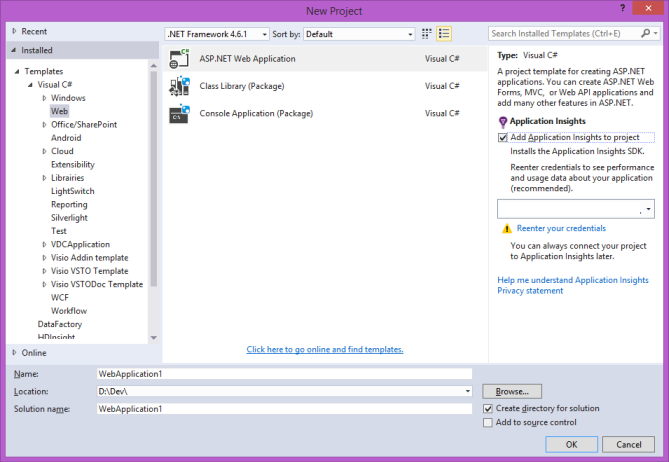
- Select File => New Project
- Choose Templates=> Visual C# => Web => ASP.NET Web Application
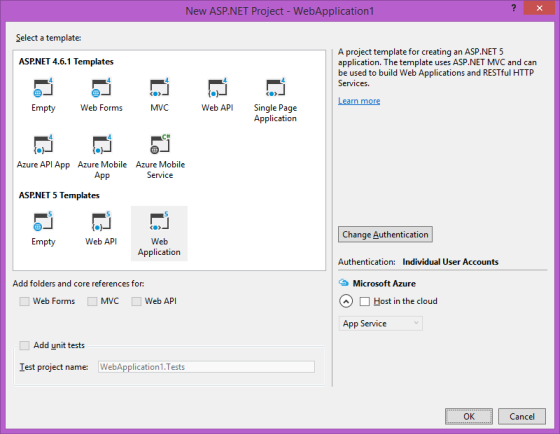
If you don’t want to deploy on Azure just uncheck “Host in the cloud”.
Add the appropriate project reference
Add a reference to the “dnx451” Ignite UI MVC assembly which is found at this location
<INSTALL_DIR>Infragistics2015.2Ignite UIMVCMVC6Bindnx451Infragistics.Web.Mvc.dll
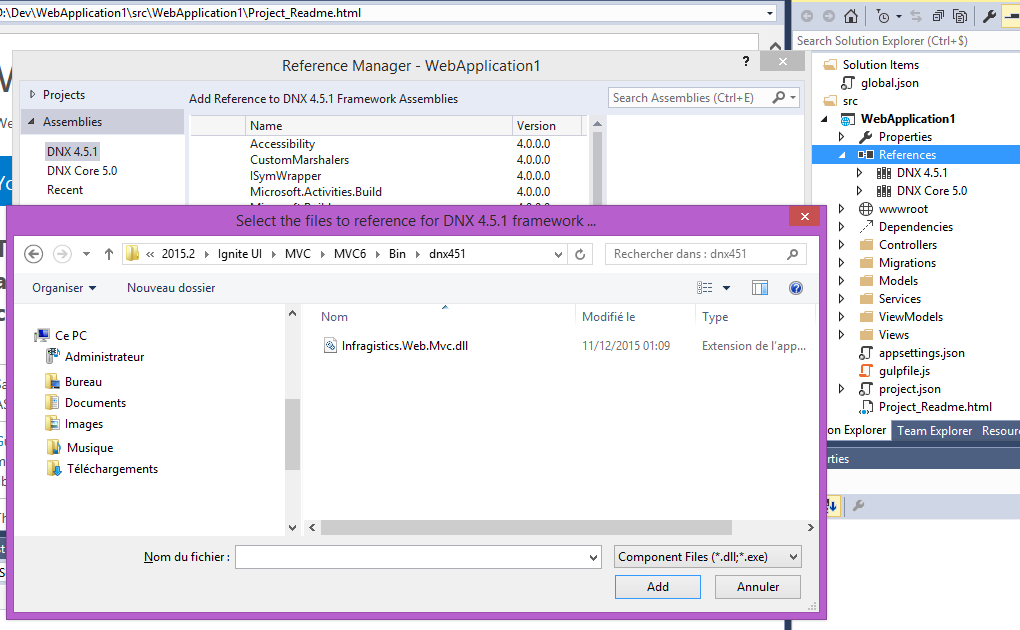
Add a reference to the “dnxcore50” Ignite UI MVC assembly which is found at this location
<INSTALL_DIR>Infragistics2015.2Ignite UIMVCMVC6Bindnxcore50Infragistics.Web.Mvc.dll
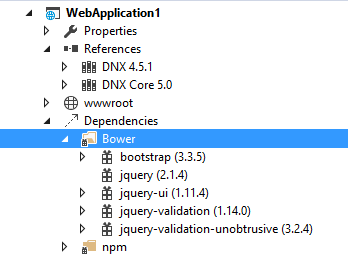
Add the “jquery-ui” bower package in using the right-click menu on the bower folder of dependencies of the project.
- Create a folder « Infragistics » in the « WebApplication1srcWebApplication1wwwrootlib » folder
- Create a « cssstructure » folder, a « cssthemesinfragistics » and a « js » folder in it.
- copy the « <INSTALL_DIR>Infragistics2015.2Ignite UIcssthemeinfragisticsinfragistics.theme.css » file in the “themes” folder of the project.
- copy the « <INSTALL_DIR>Infragistics2015.2Ignite UIcssstructureinfragistics.css » file in the “structure” folder of the project.
- copy the « <INSTALL_DIR>Infragistics2015.2Ignite UIjs jsinfragistics.core.js » file in the “js” folder of the project.
- copy the « <INSTALL_DIR>Infragistics2015.2Ignite UIjs jsinfragistics.lob.js » file in the “js” folder of the project
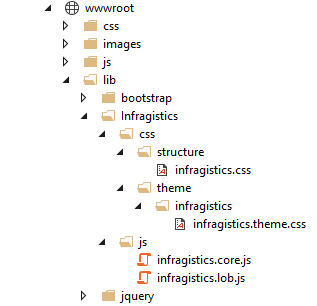
Add the appropriate style reference for the views
In the _Layout.cshtml” (that is used as the general template for the views) add the style reference
<!DOCTYPE html>
<html>
<head>
<meta http-equiv="Content-Type" content="text/html; charset=utf-8"/>
<meta charset="utf-8" />
<meta name="viewport" content="width=device-width, initial-scale=1.0">
<title>@ViewBag.Title - Mon application ASP.NET</title>
@Styles.Render("~/Content/css")
@Scripts.Render("~/bundles/modernizr")
</head>
<body>
<nav class="navbar navbar-expand-sm navbar-toggleable-sm navbar-dark bg-dark">
<div class="container">
@Html.ActionLink("Nom d'application", "Index", "Home", new { area = "" }, new { @class = "navbar-brand" })
<button type="button" class="navbar-toggler" data-bs-toggle="collapse" data-bs-target=".navbar-collapse" title="Activer/désactiver la navigation" aria-controls="navbarSupportedContent"
aria-expanded="false" aria-label="Toggle navigation">
<span class="navbar-toggler-icon"></span>
</button>
<div class="collapse navbar-collapse d-sm-inline-flex justify-content-between">
<ul class="navbar-nav flex-grow-1">
<li>@Html.ActionLink("Accueil", "Index", "Home", new { area = "" }, new { @class = "nav-link" })</li>
<li>@Html.ActionLink("À propos de", "About", "Home", new { area = "" }, new { @class = "nav-link" })</li>
<li>@Html.ActionLink("Contact", "Contact", "Home", new { area = "" }, new { @class = "nav-link" })</li>
</ul>
</div>
</div>
</nav>
<div class="container body-content">
@RenderBody()
<hr />
<footer>
<p>© @DateTime.Now.Year - Mon application ASP.NET</p>
</footer>
</div>
@Scripts.Render("~/bundles/jquery")
@Scripts.Render("~/bundles/bootstrap")
@RenderSection("scripts", required: false)
</body>
</html>